
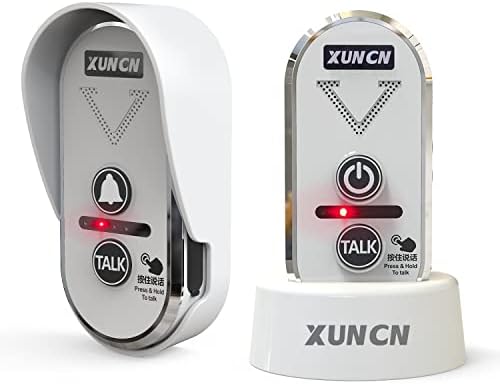
XUNCN Wireless intercom doorbell for home classroom, intercom waterproof electronic doorbell chime with 1/2 mile range 3 volume levels usb powered rechargeable battery room intercom
$88.91



Price: $88.91
(as of Jul 11,2022 16:55:12 UTC – Details)

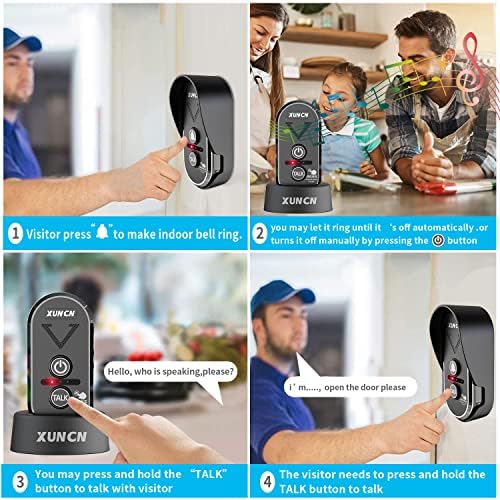
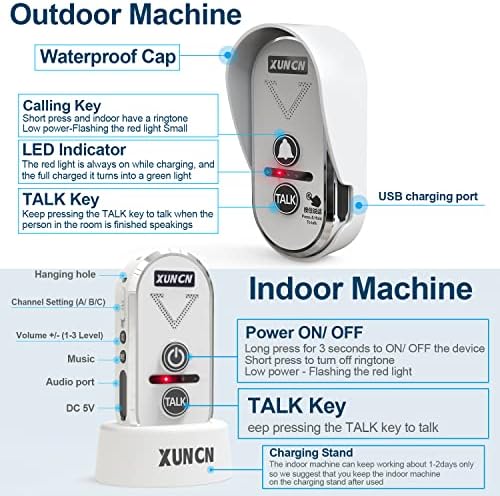
How to use the wireless intercom doorbell 1) Set the same channel (A, B, or C) for both the indoor and outdoor machine; 2) Long press the ON/OFF button of the indoor machine to turn it on; 3) Attach the outdoor machine to the exterior of your front door. Once the chime rings, click the ONOFF button or the TALK button of the indoor chime to stop the ringing. To speak to the visitor, press and hold the TALK key to communicate with the outdoor device. Release the TALK button after speaking to listen to any response from outside. The visitor simply press and hold the TALK key to respond. Note: 1.The factory setting of the indoor machine is in the shutdown state. After receiving the goods, please long press ON/OFF key button for 3 seconds to turn on the indoor unit. 2.Outdoor machine will return to sleeping mode if it does not detect action within 25 seconds. Please click CALL button on the outdoor machine to activate it. Each conversation must be initiated by outdoor machine, and then the indoor machine can talk with the outdoor unit after receiving the ring. 3.This wireless intercom doorbell is a unidirectional transmission system with the same frequency. You cannot speak to your visitor and listen to them at the same time. Please wait until the visitor is done speaking to press the TALK key to respond. 4. Please note that you will need to set the same channel if you want 2 intercom doorbells to receive communication. It also means any other FM wireless intercom device can communicate with your system if they have the same frequency. For example, your neighbors may be able to interfere with your intercom system if they are using intercom device. We suggest setting your system to another channel to avoid interference. Troubleshooting: Problem 1: Does not work Possible solution 1: Check if the indoor machine turned on. If not, please long press the ON/OFF key of the indoor machine to activate it. Possible solution 2: Check if both devices are charged. Charge
2. [Long Distance and Easy Sound Adjustment] This is an upgraded version of the doorbell with voice intercom, wireless doorbell transmission distance up to 1/2 mile! Customize your doorbell with 20 ringtones and 3 volume levels! Fashionable style and stable performance
3. [100% satisfied with the new upgrade] Please press and hold the ON/OFF button for 3 seconds to turn on the indoor unit, it is an upgraded version of the doorbell, adding a USB charging interface, and an audio interface, you can connect headphones! Multiple channels (A, B, C)
4. [Anti-interference multi-function] This doorbell doubles as an FM wireless intercom doorbell, free from WiFi interference! It also won’t interfere with your other smart devices. Buy two receivers to use as a walkie-talkie, or use the room walkie-talkie’s silent mode to turn off the unit when you need to mute.
5. [IPX55 waterproof built-in rechargeable battery] The doorbell can be charged by adding a USB interface, and it can also be used to power the doorbell for a long time. The transmitter can be used for 5-7 months when fully charged, and the indoor unit can be used for 1-2 days when fully charged. The intercom doorbell is waterproof even in severe weather conditions like snowstorms. Features low power consumption, built-in 1800mA battery and included charging cradle!

![elago Silicone Case Designed for Google Nest Hello Video Doorbell (2021 Battery Model) – Weather and UV Resistant, Perfect Color Match, Clean Finish, NOT Compatible with Wired Model [Black]](https://m.media-amazon.com/images/I/21qnm1ahEoL._AC_.jpg)


There are no reviews yet.