

SaiDian 1Pcs 5.25 inch Fan Speed Controller Computer Temperature Sensor LCD Date Time Display PC Bay Front Panel
$44.74



Price: $44.74
(as of Aug 04,2022 18:05:53 UTC – Details)

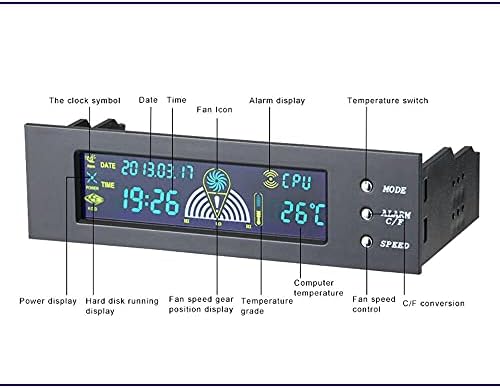
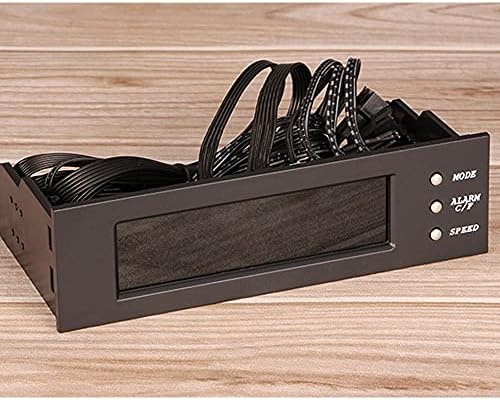
Instructions: Switch display of three groups of temperature values: In the initial state, press MODE SW to switch the display of the three groups of temperature values. The sequence of switching is: CPU?HDD?SYS?CPU?…… Turn on and turn off the alarm clock function: In the initial state, press ALARM C/F SW to start Turn off the alarm clock function. full-screen display: In the initial state, long press SPEED SW for 3 seconds to display All patterns will be displayed. Switch Degree C/Degree F temperature display mode: In the initial state, press and hold ALARM C/F for about 3 seconds to switch the Degree C/Degree F temperature display mode Fan adjustment: In the initial state, click SPEED once to set the low speed of the fan ? click SPEED twice to set the middle speed of the fan ? click SPEED three times to set the high speed of the fan (outside the CPU fan) Chassis power status display: After booting, the POWER icon will indicate the power supply is working in an animated manner. Hard disk working icon: It is displayed statically in non-working state; displayed dynamically and cyclically in working state. Adjustment of set value: Powerful heat dissipation fan speed controller optical drive bit 5.25 inch computer box speed controller desktop temperature controller Manual measurement, with small error. Please check size in detail before purchase. Real colors may slightly differ from the pictures, as it depends on specific monitor settings and light brightness. We highly appreciate all customers opinions to improve the selling, also if anything you unsatisfied, please contact us for probable best solution. Package Includes: 1Pcs
Large screen displays temperature: temperature, fan speed, alarm temperature, hard disk status. Keep abreast of working status
This fan speed controller can control the speed manually and automatically the alarm ,temperature range can be manually set from 50 degrees to 90 degreesto prevent computer hardware damage from overheating effectively -It can slow down the speed when high temperature and fan abnormal, also can adjust trough manually setting the fan speed to regulate the computer temperature
Power supply interface: big 4P male + Female; Fan interface: 3pin interface; Controllable fan: 3 groups of fans can be controlled; Link line length: fan line 60cm; Installation position: optical drive of chassis
Output voltage: 5V-12V;Input voltage: 5V and 12V;Power: 10W


There are no reviews yet.