
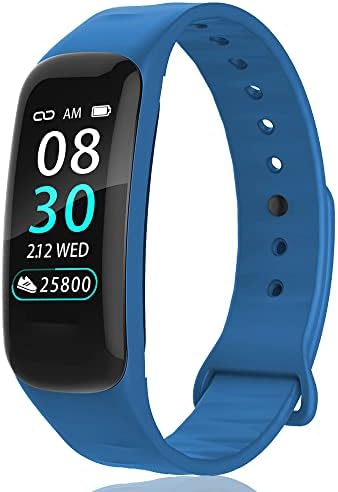
Fitness Tracker,Smart Watch with Body Temperature Heart Rate Blood Pressure Sleep Health Monitor,Pedometer Watch with Step Calorie Counter,Activity Tracker for Kids Women Men (M-Blue)
$49.44


Price: $49.44
(as of Jul 26,2022 03:17:52 UTC – Details)

Note:
The measurement data is for reference only and cannot be used for medical purposes.
How to pair:
Turn on the phone’s Bluetooth, allow the app to access the phone, then open the “Walkfit” app, and click “Start Scan”—“C1W”—“Allow pairing”.
How to re-pair:
Open the app, click “Setting”—“Remove”—“Confirm”. Then open the phone settings “Bluetooth”-“C1W” click on the right side —“Forget This Device”; finally to the app Perform re-pairing.
How to modify the time:
After the fitness tracker is paired with the app, leave the phone page in the “Setting” of the app to check whether it is paired, then restart the watch, and then observe whether the app is re-paired; the time of the watch will be synchronized to the time of the phone.
How to set the alarm:
Click “Setting”-“Alarm Setting”-“+” to add an alarm clock. (Maximum 8 alarms can be set)
Why is there no sleep data?
When a person is sleeping, the motion pedometer sensor will record a series of arm activities such as stillness and rollover tojudge the quality of the person’s sleep, including awake, light sleep and deep sleep. If the physical activity is too frequent during sleep,it means that the sleep quality is poor and the bracelet is recognized as not sleeping.In addition, the bracelet is worn tooloosely and the device cannot recognize the sleeping state.
Why is the test heart rate data biased?
The sensor on the wristband end will emit a beam of light to illuminate the skin to measure the reflected/transmitted light. Because blood absorbs light of a specific wavelength, each time the heart pumps blood, that wavelength will be absorbed in large amounts to determine the heartbeat. If the bracelet is worn too loose, the speed of light cannot be effectively rradiated on the skin, which may cause the test heart rate value to be biased or there is no heart rate data.
【Real-time Body Temperature Monitoring】The fitness tracker has a built-in thermal sensor, which can achieve 24-hour body temperature measurement. You can also view the data and set the measurement time distance in the “Walkfit” APP.
【Heart Rate and Sleep Monitor】Real-time automatic tracking of 24-hour heart rate, and automatic sleep monitoring, you can understand your sleep quality from the “Walkfit” App to help you adjust a healthy lifestyle.
【Smart Reminder Function】After the smart watch is paired with the mobile phone; phone calls, text messages and Facebook, Instagram, Twitter, whatsApp messages will remind you through bright screen vibration, you can also set alarm reminders, sedentary reminders, so you will not miss anything Important information.
【Easy Charging and Compatibility】Align the metal of the charging clip with the metal clip on the back of the watch, and then plug the charging cable into the USB Wall Charger to charge. This fitness watch app is the “Walkfit” APP, you can download it in the app store or Google Play store , and then search and pair in the app.


There are no reviews yet.